

MDM. EDR. XDR. SIEM. DLP. IAM. CASB. SOAR.
Every one of those three and four letter acronyms exists because attackers have a thick tactical playbook, and each one is built to counter a different page of it. And now we're stuck with alphabet soup.
That can become a lot to keep up with, but what matters more than memorizing the acronyms is understanding what each technology actually does, so you know when it applies and when it doesn't.
Now, I'm reminded of one of the mix-ups I battled with early on when I first heard about XDR because there was already EDR and firewalls. My thoughts were, 'well now what the heck does that do?' and a brief Google search had me questioning whether there was overlap with what a firewall already does.
To answer that question, I started with the tool I was most familiar with, then worked outward.
What Each Tool Actually Does
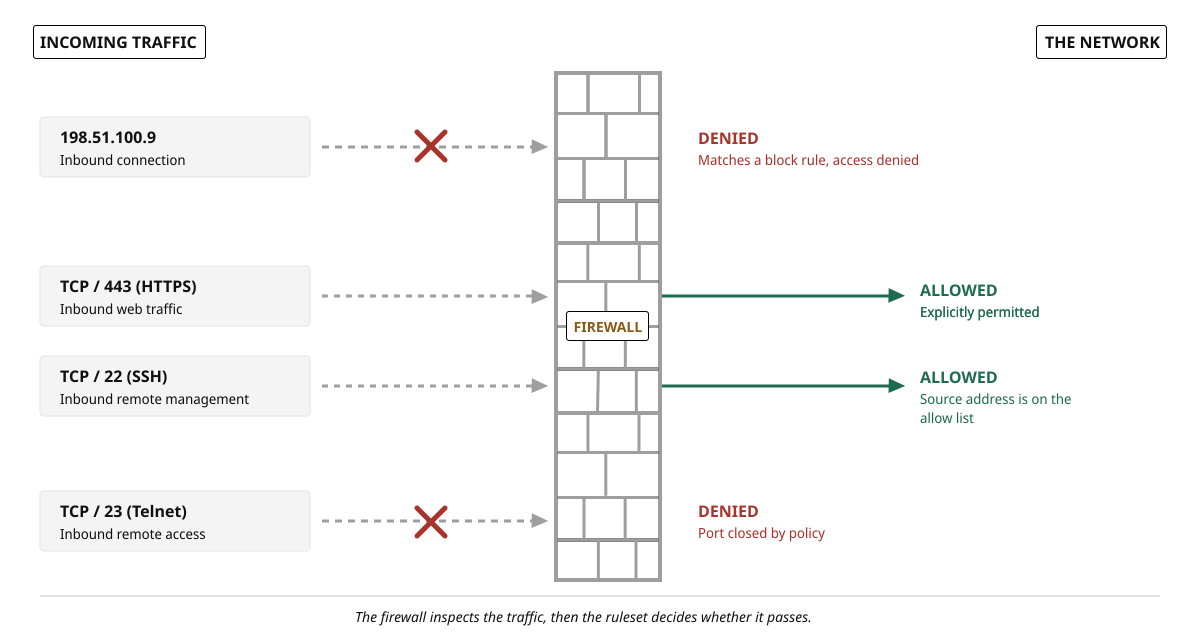
Firewalls are the security checkpoints on networks that decide which traffic is allowed to pass through and exit. The classic visual is a brick wall sitting at the network perimeter, with a gate that opens for some traffic and stays shut for the rest. In practice, firewalls are not limited to a perimeter network; they also run on hosts and inside cloud environments, while still doing the same job. Inspect the incoming and outgoing traffic then decide whether to grant passage.
For example, you can design a rule that says to block all incoming traffic from a specific IP address. It is the firewall's job to filter out that traffic and make certain that it doesn't enter the network. Similarly, if you explicitly allow incoming traffic on port 443 (HTTPS), traffic from the web will flow into the network. The firewall collects information during traffic inspection and makes these decisions based on the rulesets.
The Endpoint Detection and Response (EDR) tool, however, does its work on the endpoints like laptops, desktops, and servers. While the firewall watches traffic at the border serving as a first layer of defense, EDR is monitoring the activity on its designated device. It looks out for any process behaving strangely and behaviors that are abnormal based on patterns. The goal of EDR is to catch the threats that make it past the first line of defense (firewall) or those that originate from within the network.
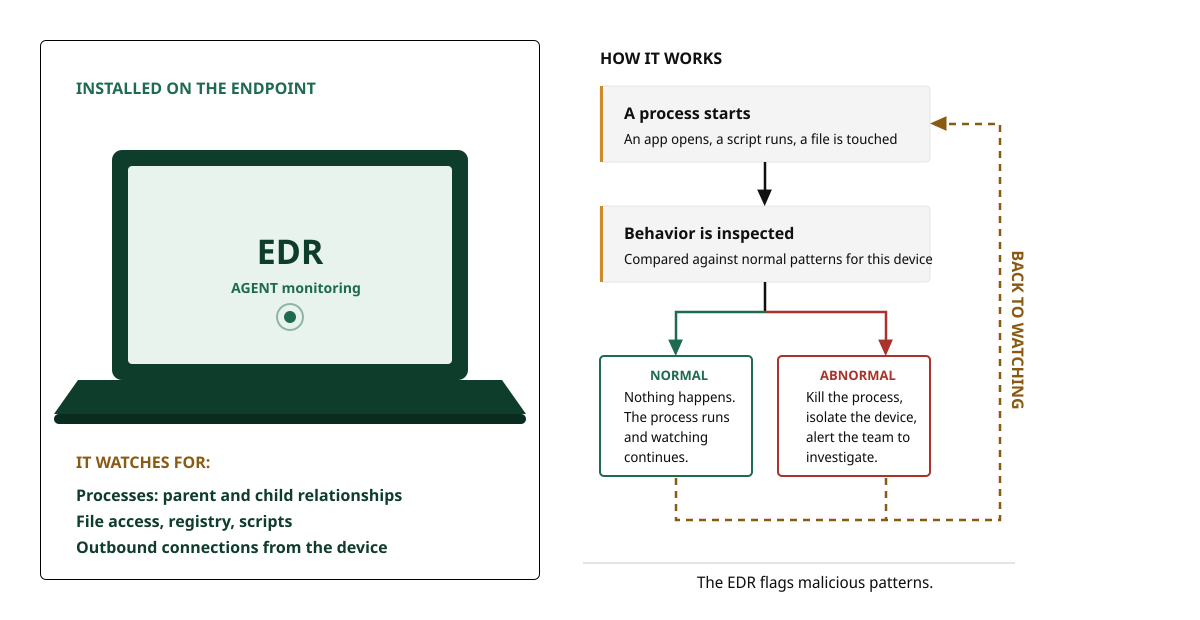
Imagine a scenario where the firewall sees a connection request from an external IP address. It will check its rules and may find nothing that denies the traffic, so it then allows that connection. However, that connection drops malware onto the laptop which has an EDR agent. The firewall actually did its job correctly because the connection did not appear malicious based on the information it had. But that's where EDR takes over, because its job is to watch that laptop's behavior, and it should catch the malware when it tries to execute.
Why You Need Both
This is a simple version of defense in depth. Defense in depth isn't about having one flawless security tool. It requires layering protections so that when one layer misses something, another layer catches it, like in the example above.
Let's say an employee clicks a phishing link on their work laptop. The firewall might not block it if the phishing site looks legitimate and uses HTTPS, so the connection would go through. As a result, malware might be downloaded during the user's browsing session. When that malware tries to execute on the laptop, the EDR sees the unusual behavior, identifies it as a threat, and will likely isolate the device before the malware can spread across the network.
Let's consider another example. Say an employee visits a compromised website and the page runs a script in the background. That script then launches PowerShell with no prompt or download for the user to click, and instructs it to download malware from a server the attacker controls and run it directly in memory, so nothing is written to the drive. In this scenario, the firewall has very little to go on, because the connection is outbound and encrypted, and the site itself may still carry a clean reputation given that it was legitimate right up until the moment it was compromised. EDR earns its keep here, because it is looking at something totally different. When it sees a web browser spawning PowerShell, it understands that action to not necessarily be normal on that user's laptop. In the same way, it gets tipped off when PowerShell runs hidden commands as it reaches out to an unfamiliar address. None of those actions are malicious on their own, but together they form a pattern the EDR is designed to flag. It can then kill the process and isolate the device while the technical team investigates.
The XDR Question
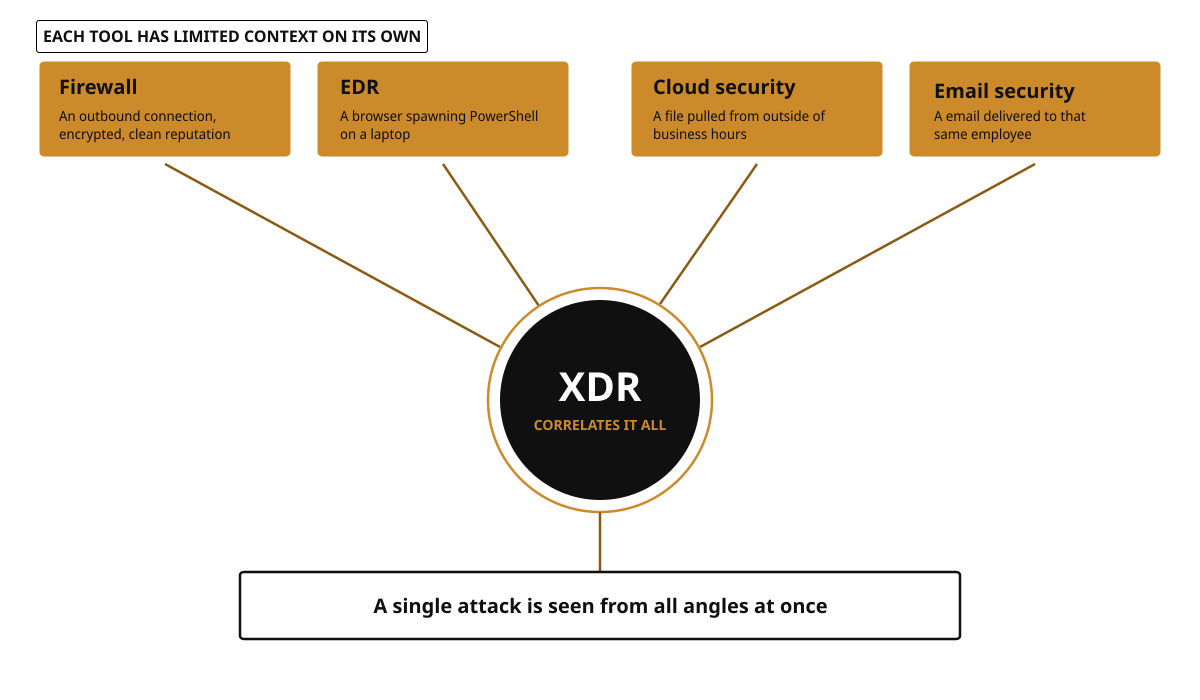
So what about XDR? How does it fit into this sequence of security? Extended Detection and Response, or XDR, tries to connect data from all your security tools: EDR, network detection, cloud security, and email security. While the firewall and EDR tools work independently, XDR takes what each of them reports and correlates it. This alone makes it useful for spotting attacks that operate across multiple layers.
If that sounds like a SIEM to you, you are not wrong to notice the similarity. Both collect data from multiple sources and look for the connections between them. The difference is in what they take in and how much work you do. A SIEM casts a wide net and ingests logs from nearly anything that produces them, then it stores those records for searching, reporting, and compliance evidence. But most of the detection logic is yours to write and yours to tune. XDR uses a narrower set of sources with the correlation already built.
Which brings me back to the question I started with. XDR does not replace the firewall or EDR, nor does it overlap with them. Instead, it sits above both and reads what they produce. The firewall still inspects traffic, EDR still watches the endpoint, and XDR is what notices when those two are describing the same attack from different angles.